Free Vulnerability Scanner
An agent-based vulnerability scanner for Windows, macOS, and Linux endpoints. It reads installed software continuously and matches it against published CVEs. 200 endpoints free forever, commercial use allowed, no trial clock.
What the free scanner shows you
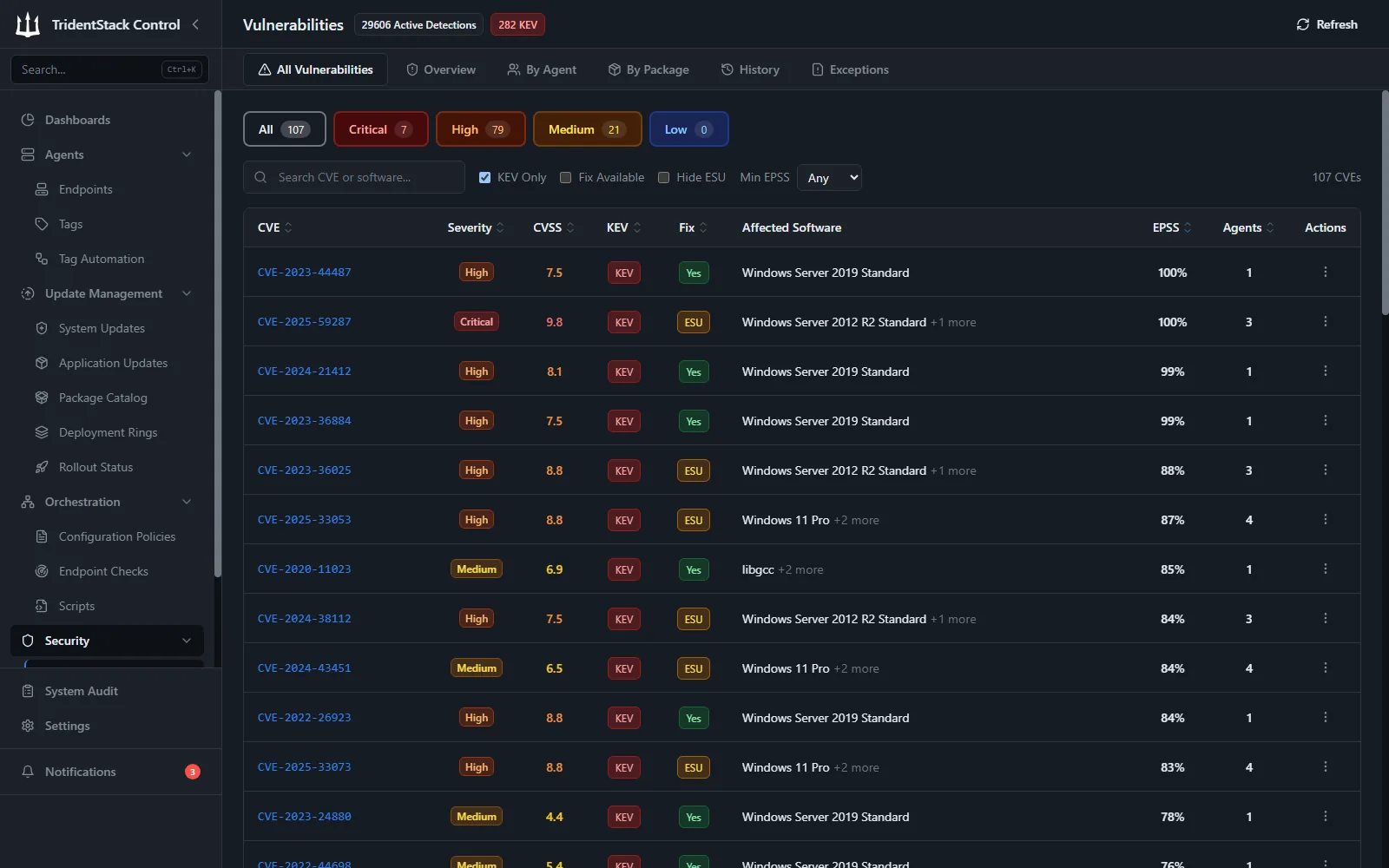
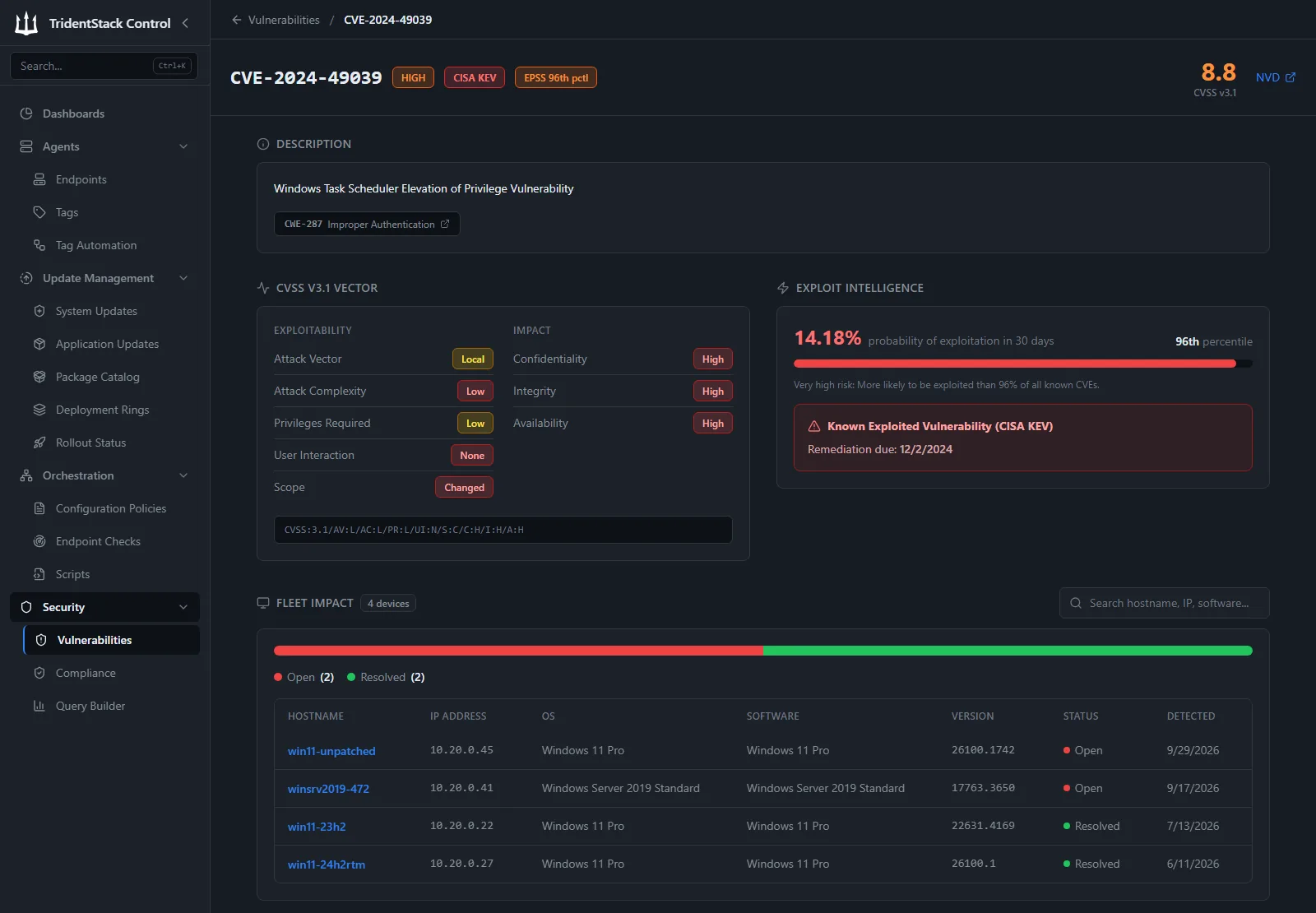
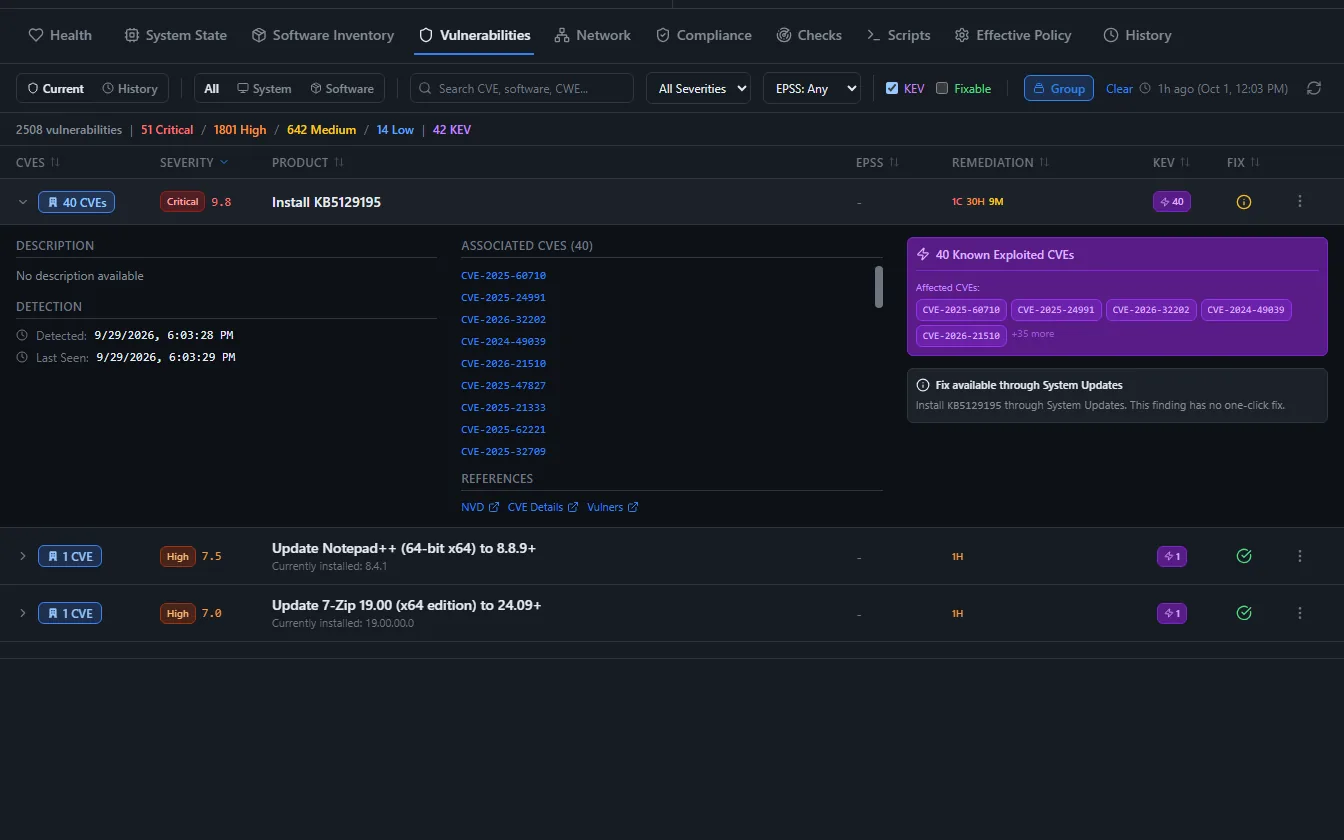
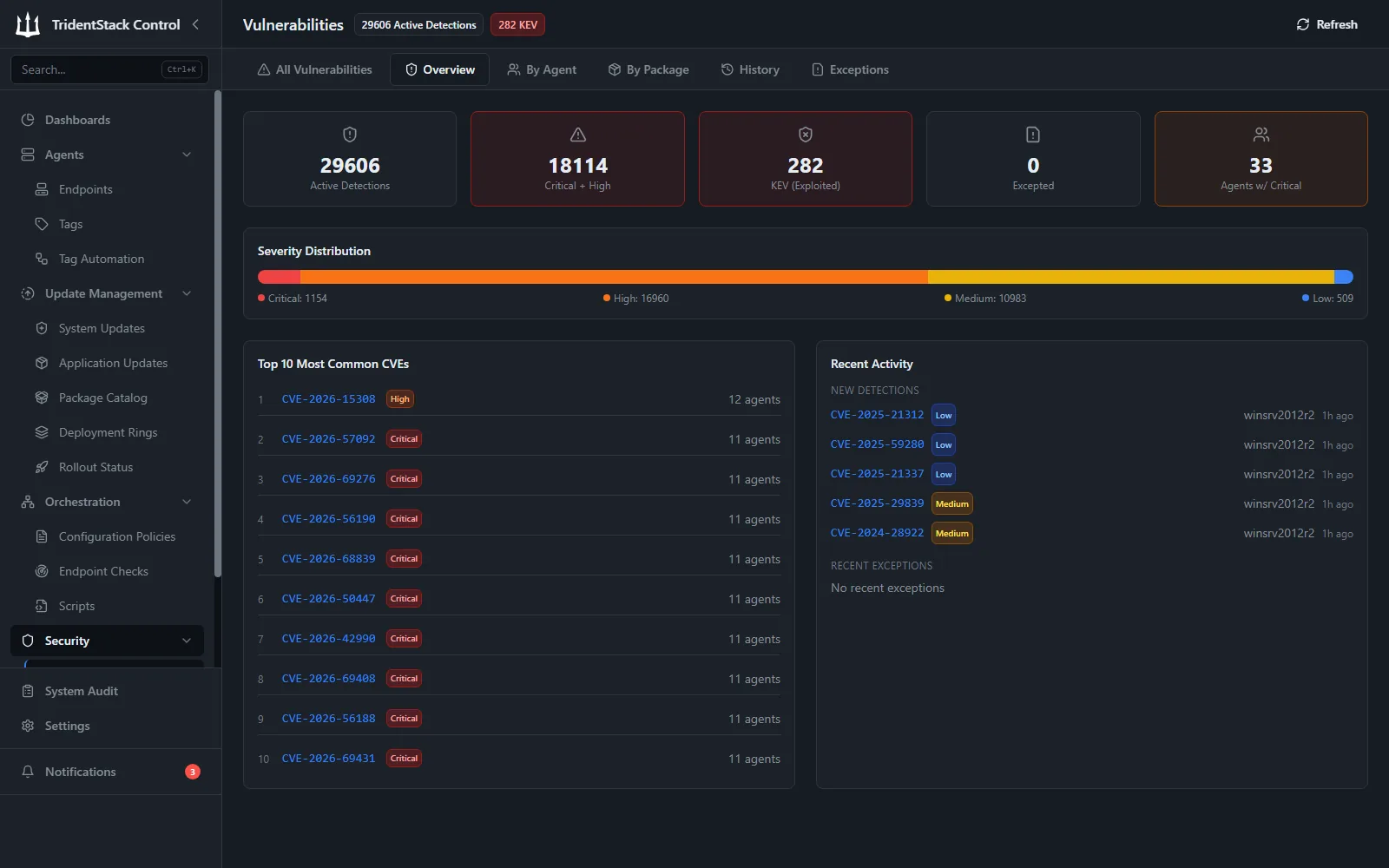
Screenshots from TridentStack Control on our lab fleet of Windows, Windows Server, macOS, and Ubuntu endpoints. There are no paid add-ons: everything shown here is included free for your first 200 endpoints.
What counts as a free vulnerability scanner?
The word free hides three different products. A non-commercial edition like Nessus Essentials gives you a capable scanner for a home lab, but its license forbids business use and expires. Open-source scanners are free to run, but you host, schedule, and operate them yourself, and the free feeds and appliances drop the features that make them run unattended. A free-forever offer gives you the full platform, limited only by endpoint count, for production use, with nothing to expire.
There is a second split that matters more for a fleet: a point-in-time network scan or a command-line artifact scan tells you what was exposed the moment it ran, while a continuous agent watches software inventory and flags new CVEs as they land. The table below sorts the main free options by that line, and by whether the finding actually connects to fixing the machine.
The free options, compared
A fair look at the main free ways to find vulnerabilities on endpoints today, checked against each source page. Rapid7 InsightVM and Qualys Community Edition are not listed: InsightVM is a trial, not a free tier, and Qualys does not publish current Community Edition limits.
| Tool | Free limit | Platforms | Continuous agent | Ties to patching | The catch |
|---|---|---|---|---|---|
| TridentStack Control | 200 endpoints, forever | Windows, macOS, Linux | Yes | Yes | $5/endpoint/mo past 200, commercial use fine |
| Action1 | 200 endpoints, forever | Windows, macOS | Yes | Yes | Its documentation lists Linux vulnerability assessment as unsupported; DISA STIG configuration is a paid add-on; quote-based past 200 |
| Nessus Essentials (Tenable) | Up to 5 IPs, 30-day license | Any host, over the network | No, point-in-time | No | Non-commercial use only; 30-day-delayed feed; no reporting or export on free |
| OpenVAS / Greenbone CE | Free/OSS, no seat cap | Network scan, self-hosted | No, scheduled scans | No | Community Feed only; the free appliance drops schedules, notifications, and backups; forum support |
| Wazuh | Free/OSS, self-hosted | Windows, macOS, Linux (agent) | Yes | No | A broad XDR and SIEM you self-host and operate; managed Wazuh Cloud is paid |
| Intruder (Free plan) | Up to 5 external targets | External IPs and websites, plus limited cloud and container checks | No, weekly external scans | No | No endpoint agent on the free plan; the agent is on paid plans |
| Trivy (Aqua) | Free/OSS, no cap | Images, filesystems, repos, k8s | No, command-line scan | No | Scans build artifacts, not a continuous endpoint agent; no fleet dashboard or scheduling |
Free offers verified against each vendor's own page.
What you get free
Every capability below is included for your first 200 endpoints, at no cost, for production use.
Continuous CVE detection
Vulnerabilities are matched from software inventory as it changes, not only when you remember to launch a scan.
Risk-based prioritization
Findings carry CVSS severity, EPSS exploit-prediction scores, and CISA KEV status, so you triage by real risk instead of raw counts.
Tied to remediation
Detection connects to patch deployment in the same platform, so a finding leads to a fix, not another ticket.
Exception management
Accept a risk with an expiration date and an audit trail, so exceptions do not quietly become permanent.
Fleet-wide dashboard
See exposure across every managed endpoint in one place, filtered by severity, asset, or tag.
Unlimited admin users
Bring your whole team. Role-based access is included, with no per-seat fees.
When you outgrow free
Past your first 200 endpoints it is $5 per endpoint per month, every feature still included, no tiers. See the pricing calculator.
Endpoint, network, or website scanner: which one do you need?
Search for a free vulnerability scanner and you get three kinds of tool that answer different questions. A website or web application scanner, such as OWASP ZAP or a hosted scanning service, probes a URL for flaws like cross-site scripting and SQL injection. A network scanner, such as OpenVAS or Nessus Essentials, sweeps IP ranges and reports the services it can reach. An endpoint scanner runs on each machine, reads what is installed, and matches that inventory against published CVEs.
TridentStack Control is an endpoint scanner. It fits when the question is which laptops and servers run vulnerable software and what to patch first. If you also need to test a public website, pair it with a web application scanner: the two cover different ground, and neither replaces the other.
Free vulnerability scanner for Windows 11 and Windows Server
On Windows, the agent reports both the operating system and the software installed on it. Detection covers Windows 10, Windows 11, and Windows Server, including machines with long update histories, alongside third-party applications such as browsers, archivers, and device and chipset drivers.
Each finding shows its CVSS severity, its EPSS exploit-prediction score, and whether it is in the CISA Known Exploited Vulnerabilities catalog, so the short list of what to fix today is obvious. When TridentStack Control has a fix available, it is named next to the finding, the Windows security update or the application version to install, and you can deploy it from the same console.
Free vulnerability management software, not only a scanner
A scanner finds problems. Vulnerability management also decides what to fix first, fixes it, and records the decision. TridentStack Control does all three, free for your first 200 endpoints: findings are ranked by CVSS, EPSS, and CISA KEV status, the fix deploys from the same console, and accepted risks carry an expiry date and an audit trail.
That is the practical difference from a free network scanner: the report does not end at a list of CVEs, it ends at patched machines.
Free CVE scanner for Linux and Windows servers
The agent runs the same way on servers as on workstations, so you get continuous CVE detection on Linux and Windows Server without standing up a separate scanner. On Linux, coverage spans Ubuntu, Debian, RHEL and CentOS Stream, Rocky Linux, AlmaLinux, and Amazon Linux, matched against each distribution's advisory data rather than a generic guess.
Because detection reads from software inventory instead of a scheduled network sweep, a newly disclosed CVE surfaces against every affected server as soon as its data updates, and the same platform can deploy the fix. That is the difference between a free CVE scanner that produces a report and one that closes the loop.
More free tools from TridentStack Control
Free Patch Management Software
Patch Windows, macOS, and Linux from one console. 200 endpoints free forever.
Free DISA STIG Compliance Tool
Scored DISA STIG and Microsoft Security Baseline compliance from one console, with STIG results mapped to NIST 800-53.
Free Endpoint Management Software
A web settings catalog with enforcement that works without Active Directory.
Free Group Policy Alternative
Enforce settings across Windows, macOS, and Linux without a domain controller.
Free CVE lookup
Search any CVE for its CVSS score, EPSS exploit prediction, and CISA KEV status.
Free CVE API
Query CVE, EPSS, and KEV data from your own scripts, no key required.
Frequently asked questions
Is there a free vulnerability scanner I can download?
TridentStack Control is a lightweight agent you install on each Windows, macOS, or Linux endpoint, not a one-off download. Install it on up to 200 endpoints for free and it keeps scanning as software changes.
Is there a free vulnerability scanner for Windows 11?
Yes. The TridentStack Control agent runs on Windows 11, Windows 10, and Windows Server and scans continuously for known vulnerabilities in the operating system and installed applications. Your first 200 endpoints are free forever, including for commercial use.
Can I use it to scan a website?
No. TridentStack Control scans endpoints, not public websites. For web application testing, run a dedicated web scanner such as OWASP ZAP alongside it.
Is Nessus Essentials free for business use?
No. Nessus Essentials is licensed for non-commercial use only and is limited to 5 IPs on a 30-day license. TridentStack Control is licensed for production and commercial use, free across your first 200 endpoints.
Do you scan Linux servers?
Yes. Vulnerability detection covers Ubuntu, Debian, RHEL and CentOS Stream, Rocky Linux, AlmaLinux, and Amazon Linux, matched against each distribution's advisory data, alongside Windows and macOS.
Is this a network scanner or an endpoint scanner?
It is an endpoint scanner. A lightweight agent reports software inventory, and CVEs are matched from that inventory continuously, so you do not need to point a network scanner at each subnet.
Does detection connect to fixing the machine?
Yes. Detection and patch deployment live in the same platform, so a prioritized finding leads directly to a remediation, with exception management for anything you choose to accept.
Is it really free forever, and do I need a credit card?
Your first 200 endpoints are free forever with every feature included, and you can start without entering payment details. It is not a trial and it does not expire.
Start scanning, free
200 endpoints free forever, every feature included. No credit card, no time limit.
Competitor facts verified against each vendor page. Last verified 2026-09-23. Reviewed by Adam Curtis, Founder, TridentStack.